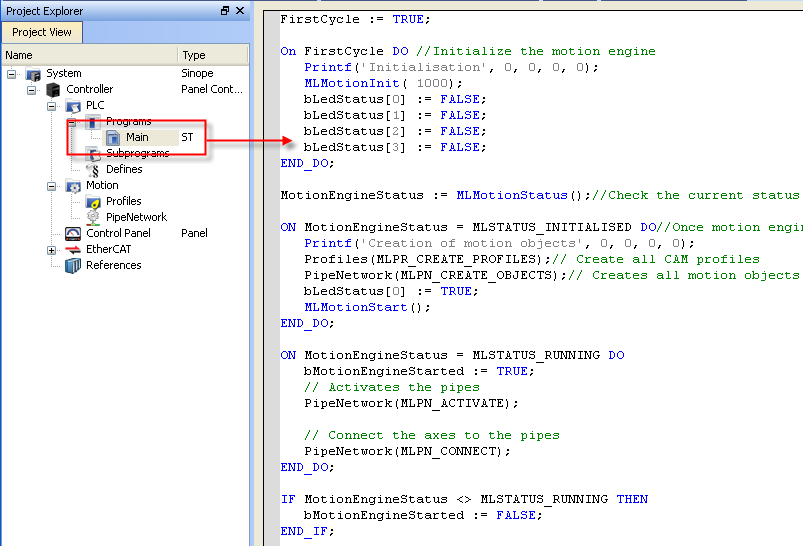
The 2-axes Pipe Network template has a ST"Structured text" A high-level language that is block structured and syntactically resembles Pascal program (called Main) that initializes, starts and runs the motion.
Figure 11-40: PN Template with ST - Main
The template has a motion profile defined with the graphical Pipe Network editor.
For more details, see Pipe Blocks Description
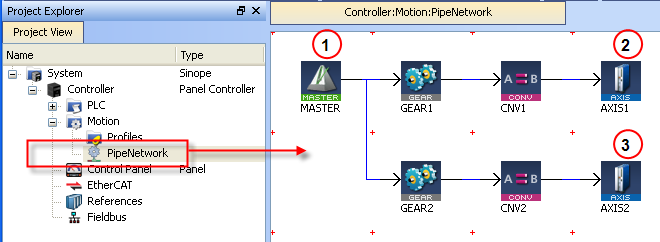
Figure 11-41: PN Template - Motion
The motion profile contains four different pipe blocks:
 ) is the generator that allows a synchronization between the two pipes (
 and
and  ).
).For more details, see Design the Control Panel with the Internal Control Panel Editor
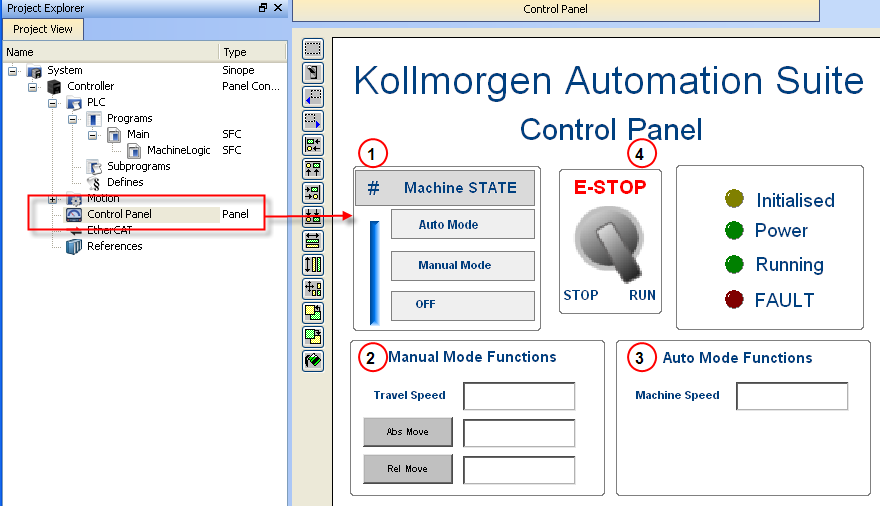
Figure 11-42: PN Template - Control Panel
|
Call out# |
Description |
|
|
Allows to choose how to run the axes between automatic and manual modes |
|
|
In manual mode, you can set the speed. You can also set an absolute and relative move. When you click those commands, the two axes move to the specified position and the speed is reset to 0 |
|
|
In automatic mode, you can set the speed |
|
|
When you click the emergency button, the machine state becomes OFF (see call out |
Table 11-38: PN Template - Control Panel
Based on the template, the project can be run:
|
Stay Connected with Kollmorgen       
|
Copyright © 2015 Kollmorgen™ |

|
